
How to Record and Review Youth Soccer Matches with an iPhone or iPad
Introduction
There are several ways to record your child’s or team’s soccer matches.
You can use the iPhone you already have.
You can use a dedicated video camera.
Or you can invest in a sports camera that uses AI to automatically track the players.
Each option has its own advantages.
But when it comes to match videos, it’s worth thinking about not only how you record the game, but also what you do with the footage afterward.
After putting in the effort to record a match, why not make the most of it?
Rewatching goals, talking with your child about their play, or sharing great moments—and even mistakes—with the team can turn match footage into something more than just a record of the game. It can become a useful tool for learning, improvement, and development.
In this article, we’ll look at the different ways to record soccer matches and then explore how you can use an iPhone or iPad to turn your match footage into something you can review and share.
Different Ways to Record a Soccer Match
There are several ways to record a soccer match, and each option has its own strengths.
iPhone / iPad
The easiest option is probably the iPhone or iPad you already have.
You can start recording a match without buying any additional equipment.
If you simply want to start recording your child’s games, it’s a convenient and accessible option.
Video Cameras
If your priority is getting good-quality footage of a soccer match, a dedicated video camera can also be a great choice.
Features such as optical zoom and support for longer recording sessions make video cameras well suited for recording entire matches.
AI-Powered Sports Cameras
If you want to automate the recording process as much as possible, there are also sports cameras equipped with AI.
Some can automatically track players or the ball while recording the entire match, and some can also edit or analyze the footage.
One of their biggest advantages is that you don’t have to spend the whole game operating the camera—you can watch the match with your own eyes.
As you can see, there are many ways to record a soccer match.
The important thing is not which option is the “best,” but which one fits your needs and what you want to do with the footage.
And there’s one more thing worth thinking about:
“What will you do with the footage after the match?”
Get More Out of Your Match Footage
If you’re recording a soccer match with an iPhone or iPad, the standard Camera app is perfectly fine.
However, match videos can be quite long, and finding the moments you want to watch, explaining plays, or putting together only the important scenes to share can take more time than you might expect.
One way to make this easier is to make your footage easier to review while you’re recording the match.
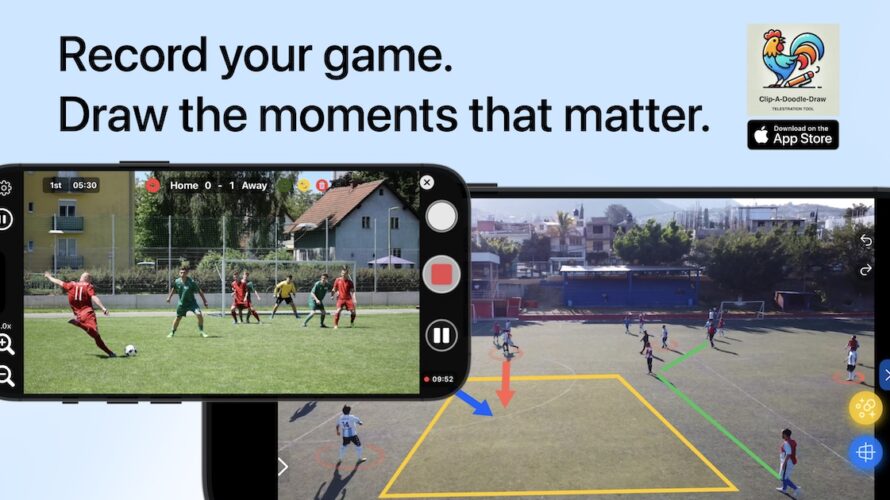
Clip-A-Doodle-Draw lets you record the match while tracking the score and elapsed time, mark moments you want to revisit, and draw lines or arrows directly on the video.
① Record the Score and Elapsed Time
When you’re recording a match, you may find yourself wondering:
“Wait, what’s the score again?”
With Clip-A-Doodle-Draw, the score and elapsed time displayed during recording are also saved in the video.
This makes it easier to understand where a particular play occurred in the context of the match when you watch the footage later. It can also save you the trouble of using video editing software to add this information afterward.
In other words, you can keep not only the match footage itself, but also a record of the match.
② Find the Plays You Want to Watch Again
Watching an entire match from beginning to end can take quite a while.
If you mark moments you want to revisit as highlights, you can jump straight to those scenes later.
Instead of searching through the entire match, you can quickly review just the plays you’re interested in.
You can also create a highlight video by combining the scenes you’ve marked.
Putting together goals and great plays can be useful not only for reviewing the match, but also for keeping a record of your child’s development or easily sharing moments with the team.
If you share your match videos on YouTube, you can also generate YouTube chapter text from the scenes you’ve marked.
By adding chapters for goals and highlight plays, viewers can quickly jump to the moments they want to watch.
③ Draw Directly on the Video to Explain a Play
Soccer plays can be difficult to explain with words alone.
“I wanted you to turn forward here.”
“This player was open.”
“You could have passed the ball here.”
Even when you explain it verbally, it can be difficult to visualize the positions and movement on the field.
With Clip-A-Doodle-Draw, you can draw lines, arrows, and other markings directly on the video while it plays.
“You were here.”
“I wanted you to look this way.”
“There was space here.”
You can point things out while watching the actual footage together.
Things that are difficult to communicate with words alone can become much clearer when you draw directly on the video.
④ Turn Match Footage into Something You Can Review
Match videos are not always easy to revisit after the game.
With Clip-A-Doodle-Draw, you can use your footage in different ways:
Record → Track the match → Mark key moments → Draw and explain → Create and share highlights
You can also play videos uploaded to YouTube and import external video files in supported formats for review.
Start with the iPhone or iPad You Already Have
The best recording method depends on the person or team.
You might want to:
- Automate recording as much as possible with an AI-powered sports camera.
- Capture the entire match with a dedicated video camera.
- Keep things simple and record the match with an iPhone.
Each is a valid option.
But if you:
- Already have an iPhone or iPad and want to use it to record matches
- Want to use your footage for reviewing the game afterward
- Want to keep track of the score and elapsed time
- Want to quickly find plays you want to watch again
- Want to draw lines or arrows on the video to explain plays to your child or players
- Want to put goals and great plays together and share them with your team
then iPhone / iPad + Clip-A-Doodle-Draw might be a good fit for you.
Before investing in expensive recording equipment, you can start by making better use of the iPhone or iPad you already have—not just to record the match, but to get more out of the footage afterward.
That’s another option worth considering.
Conclusion: Get More Out of Your Match Footage
There are many ways to record a soccer match, including an iPhone or iPad, a dedicated video camera, and AI-powered sports cameras.
Each option has its own advantages.
As one of those options, Clip-A-Doodle-Draw lets you use an iPhone or iPad not only to record a match, but also to track the game, review plays, draw directly on the video, and create and share highlight videos.
Instead of letting your match footage simply sit in your camera roll, why not use it to review the game with your child or share memorable moments with your team?
Clip-A-Doodle-Draw
From recording the match to reviewing it.
